Showing posts with label Freezer Paper. Show all posts

Monday, November 22, 2010

Craft Fair Photos, a Freezer Tee, Magnetic Boards & Freebies!

Well, here it is over a week after my first craft fair and I'm just now posting about it. It was not as successful as I had hoped. It was a lot of fun and a great learning experience, but unfortunately, it was not well advertised. There was no sign by the road and no ad in the paper. I think the person hosting relied soley on facebook to advertise. I did sell $28.00 worth. Not quite worth all the effort, but at least I have 2 more fairs to go to. The magnetic boards have sold well in my craft booth at the local trader's mall. I am selling them $10each or 2/$15.00.


These are soem Geneva "Sandra Bullock" watches that my DSIL is selling. She has them in several different colors and designs. They are $10.00 each. If you'd like to purchase one, or more, please email me at tamara_bennett7@hotmail.com Shipping is $3.00.


Here is a bracelet that I made for a local sorority girl. Their mascot is the panda. So I found these cute little panda beads on ebay. I made the red beads myself.


Here is a bracelet that I made for my DSIL. She is a dental assistant, so I got the cute little teeth beads on ebay.


And here is a t-shirt that I made for a friend's little boy. Her husband has a shirt just like it that she got him at Old Navy, but they did not make it in the baby's size, so she asked if I could make one like it. Of course! haha. I just used my cricut and SCAL and replicated the design. I cut it out in freezer paper and then used the freezer paper as a stencil to paint. If you've never tried this before, you can see a tutorial here. You can download the Gobble Gobble SVG here.


Finally, here are a couple of the magnetic boards I was talking about. I made these using decorative cookie trays that I got from the Dollar Tree. I made the bottlecap embellishments myself and cut the UK using my SCAL and cricut. You can download it here.


Here is one representing our local school colors.

Friday, April 2, 2010

Crafty things I've been making....

Wow, where do I begin? I guess you can tell my crafting mojo is back in full swing. Funny how it comes and goes. If you read my post yesterday, you know I've been spring cleaning and I cleaned my craft room as well. So maybe it is just the clean craft table that is just screaming my name. Just begging me to get over there and make something! It is easier to be inspired when you've got room to work!

So first of all, I designed and made this Twilight (New Moon) t-shirt. For those of you who are unfamiliar with the story, Jacob and Bella conspire together to fix up to old motorcycles for fun. So that is where the idea for this shirt came from. What I love most about it is that I can wear it out in public and most people would have no clue that it had anything to do with Twilight!

Here's your Thursday Freebie! Sorry it's late. Black Swan Motorcycle Shirt

Here is another Twilight inspired shirt. SPOILER ALERT--- This is due to the fact that Bella calls her baby "her little nudger" while she's preggers. So I made a shirt to wear during my pregnancy. For those of you who've been asking, I still don't know what it is yet. I'll find out April 30th!!

This is a post-it note holder that I made to go in my craft booth. I just love this little boxer girl who's fighting breast cancer! She's so cute!


Here is the flip side to the one above.
And finally, here is a baby gift for a friend of mine. She's having a girl and naming her Alexis.

Friday, March 12, 2010

An Altered Doorhanger & a Freezer Tee

Hey folks, sorry I've been MIA lately. I've had a lot going on. Had several orders from my craft booth to complete. On of which is below. I created this cute little baby boy doorhanger for a friend of mine to give as a baby gift. She sent me photos of the nursery so that I could match it. Here is what I came up with. I used the cute little svg Willie the Whale from Treasure Box Designs.
I also created this simple little t-shirt for my 3 year old to wear. Since he's going to be a big brother in September! We should find out what we're having in mid-April. Can't wait! The font I used for the tee is called "Mandingo". I love it. I used it all the time!

Friday, October 30, 2009

Freezer Paper Twilight T-Shirt

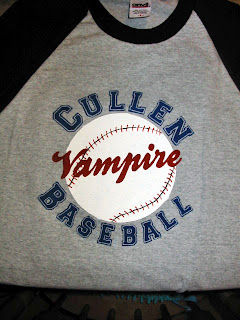
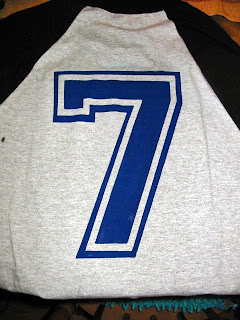
So for Halloween I'm taking the easy way out this year. I didn't feel like spending a bunch of money on a costume. And you all know i'm obsessed with Twilight. So I wanted to be a vampire baseball player. I got to looking online for a tshirt kind like this one but they were all too expensive. So I suddenly remembered that I'd seen a tutorial on how to use freezer paper and the cricut to make a custom shirt. So now I'm addicted to this new way to use my Circut. I was so impressed with the way the first one came out that I'm dying to try it again. I think next I'm going to make a christmas shirt for my son.

I started by cutting a 6" circle on freezer paper. Then I ironed the negative part and painted a white circle. Then when that was dry I painted on my stitches by hand using a pencil (to sketch it) then a small paintbrush. Then I put the "Cullen" on top. The collegiate font that I used was a little tricky to iron on. I had to position the pieces just right, but the end result was way worth the effort! Next I put "Baseball" on the bottom. And last I put "Vampire across the ball. It was the hardest part. I had a hard time getting the freezer paper to stick to the painted circle. It didn't adhere perfectly in some places so I had to use a paintbrush to do some touching up. But I am so pleased with the way it turned out. I think I might make another to sell in my Etsy store.

Saturday, April 25, 2009

Gotta Try It!

You've gotta see this! A 13-Year Old from from the Clever Someday Blog gives a tutorial on how to cut freezer paper stencils with your Cricut machine and use them to paint designs on t-shirts.


I can't wait to try this out! Check out her blog to see more examples of shirts that they have made!


This video is also from Clever Someday. It is showing how to transfer lettering from your Cricut mat to your project in perfect alignment using drywall tape (aka Magic Mesh).